

Notifications
This section covers how to set up rules that send push notifications to the waiter in the CosmosResto Waiter app.
Notifications remind the waiter about important things in their orders: offer a dessert after the main course, approach guests after they arrive, pick up a ready item. Each notification is set up as a rule: which event triggers it, when to send it and what text to show.
To open notifications, go to Waiter → Notifications.
Notifications list
Rules are shown as cards, newest first. You can find a rule by name using search - it starts working after you enter 3 characters.
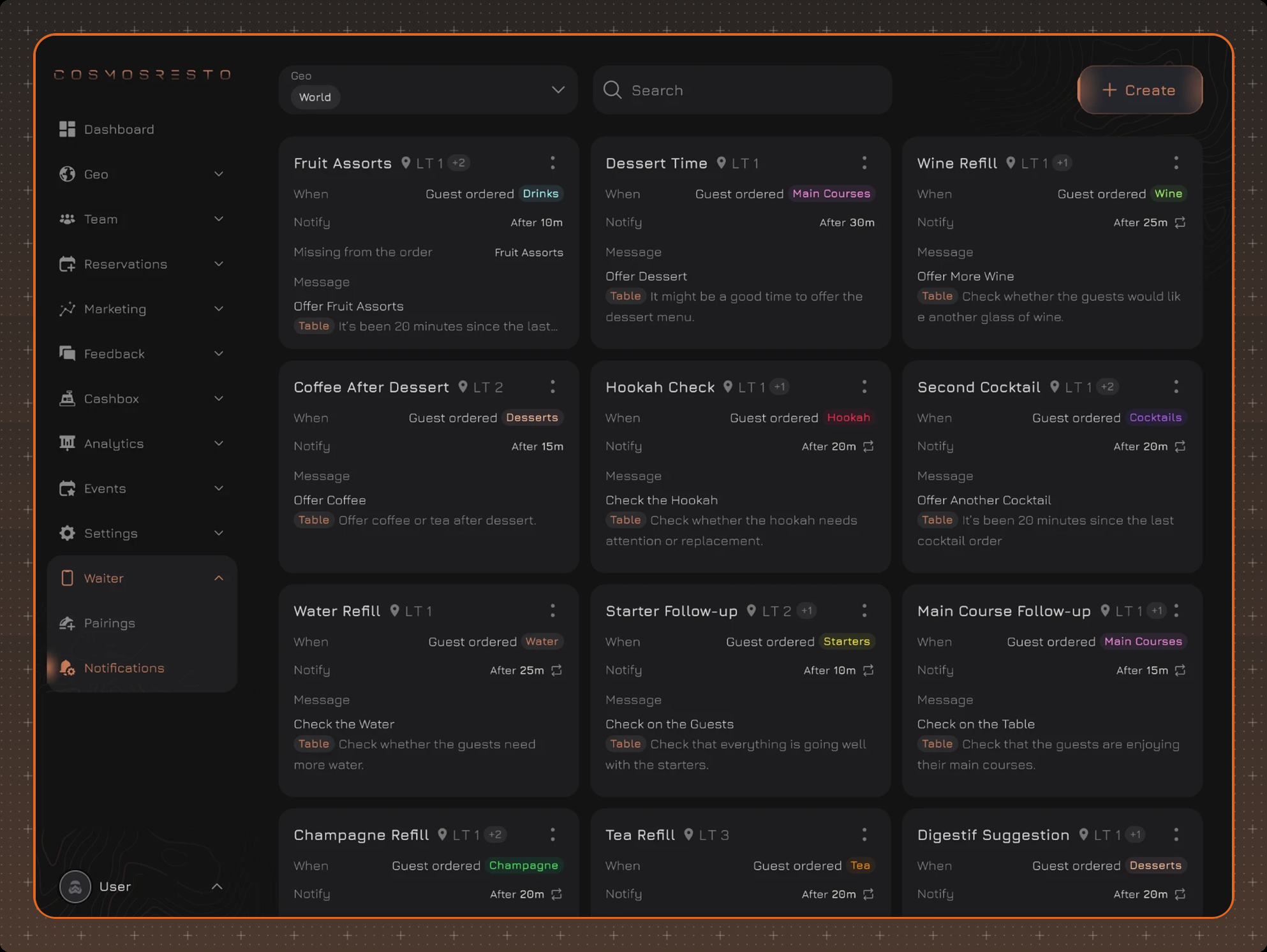
A rule starts working as soon as it is created - you don't need to turn it on separately. A rule can be edited, duplicated or deleted.
Creating a notification
Click Create and fill in the fields. The Preview block on the right shows how the push notification will look: sample values are shown instead of variables.
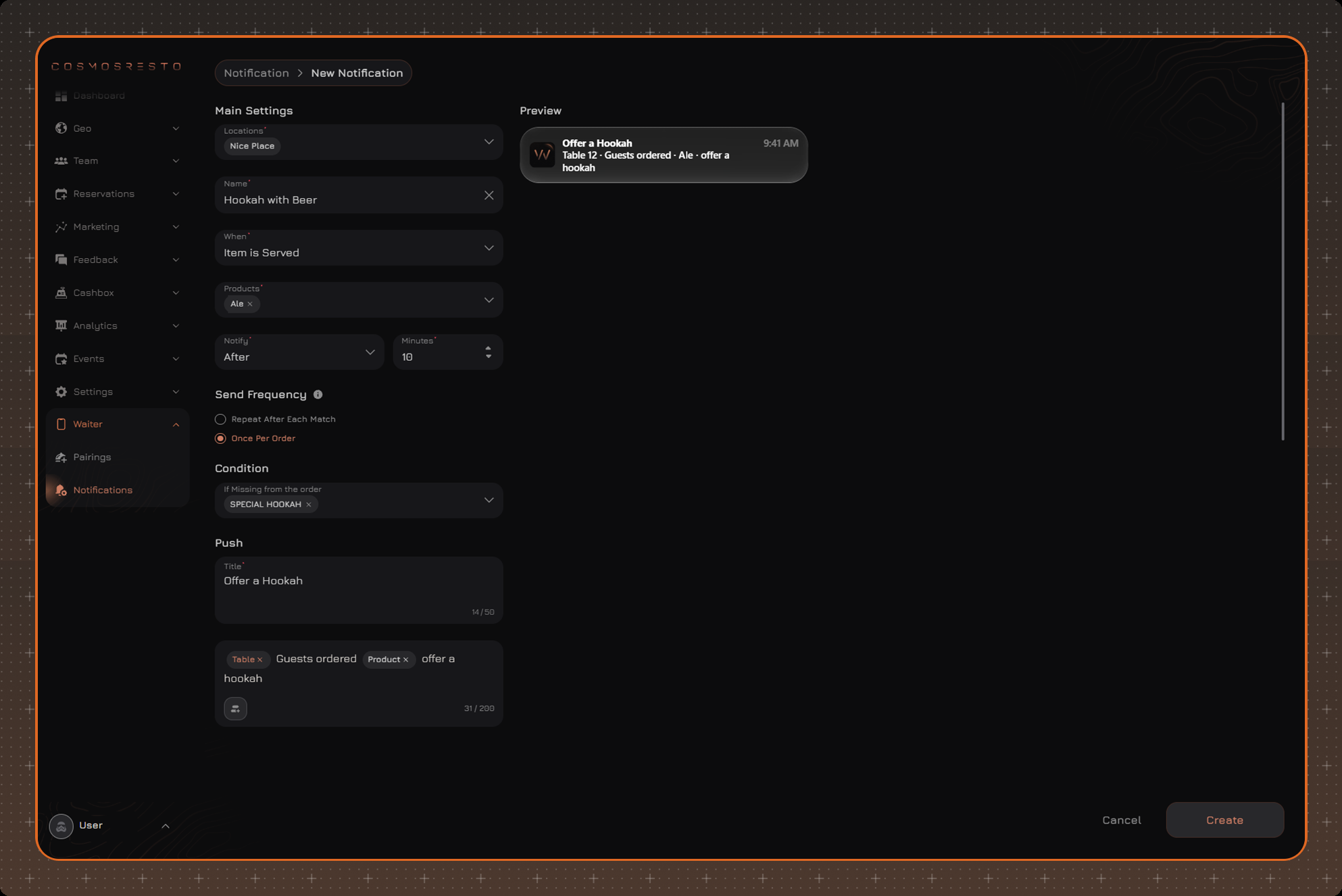
Main Settings:
- Locations - the locations where the rule works. New locations are not added to the rule automatically.
- Name - the rule name for the list. The waiter doesn't see it.
- When - the event that triggers the rule (see Events for details).
- Products - dishes or menu groups the rule reacts to.
- Notify and Minutes - Now or After the set number of minutes, from 1 to 60.
Send Frequency - Repeat After Each Match or Once Per Order (see Send Frequency for details).
Condition - the optional If Missing from the order field: dishes or menu groups. If the order already contains a selected dish or a dish from a selected group by the time of sending, the notification is not sent.
Push - the content of the push notification: Title and message text.
Events
The event in the When field is what has to happen in the order for the waiter to get a notification. The fields in the form depend on the event.
Item is Served - the rule fires when a dish selected in the Products field is added to the order. For example, guests order beer, and 10 minutes later the waiter gets a reminder to offer a hookah.
- The notification is sent only after the set number of minutes.
- Any send frequency can be selected.
- The Condition block can be filled in.
Guest Arrives - the rule fires when an order is opened for a table. Dishes are not needed here, so the form has no Products field and no Condition block.
- The notification is sent right away or after the set number of minutes.
- The notification is sent once per order.
Item Ready - the rule fires when a dish selected in the Products field is ready. In the Products field you can select all dishes at once.
- The notification is sent right away or after the set number of minutes.
- The notification is sent for each ready dish.
- The form has no Condition block.
Send Frequency
- Once Per Order - the rule fires only once in an order. Ordering the same dish again does not trigger it again.
- Repeat After Each Match - each new addition of the dish triggers the rule again. If the dish is added again before the notification is sent, the delay countdown starts over.
Variables
Variables are inserted into the message text with the button under the field. When the notification is sent, they are replaced with actual values:
- Table - the table number of the order.
- Product - the name of the dish that triggered the rule. Not available for the Guest Arrives event.
Who gets the notification
The notification goes to the waiter who is responsible for the order at the time of sending and is logged in to the app. If the order was transferred to another waiter, the new waiter gets the notification. If the order is closed or canceled before sending, the notification is not sent. Tapping the notification opens the order in the app.
Examples
Dessert after the main course
- When - Item is Served, Products - the "Main Courses" group.
- Notify - After 25 minutes, Send Frequency - Once Per Order.
- If Missing from the order - the "Desserts" group.
- Message - "Table The guests are finishing their main course - offer a dessert".
If the guests haven't ordered anything from the desserts within 25 minutes, the waiter gets a reminder.
Wine with steak
- When - Item is Served, Products - "Ribeye Steak", "Striploin Steak".
- Notify - After 5 minutes, Send Frequency - Once Per Order.
- If Missing from the order - the "Wine" group.
- Message - "Table Guests ordered Product - offer a glass of red wine".
Another drink
- When - Item is Served, Products - the "Cocktails" group.
- Notify - After 20 minutes, Send Frequency - Repeat After Each Match.
- Message - "Table Ask if they'd like another Product".
The reminder comes after each new cocktail in the order.
Welcome the guests
- When - Guest Arrives.
- Notify - After 2 minutes.
- Message - "Table Approach the guests and offer the menu and drinks".
Pick up a ready dish
- When - Item Ready, Products - all dishes.
- Notify - Now.
- Message - "Table Product is ready - pick it up from the kitchen".
Variables in the messages are shown in bold. For example, the waiter gets the notification "Table 12 · Guests ordered · Ribeye Steak · offer a glass of red wine".